To protect users from malicious content, Safe Browsing’s infrastructure analyzes web pages with web browsers running in virtual machines. This allows us to determine if a page contains malicious content, such as Javascript meant to exploit user machines. While machine learning algorithms select which web pages to inspect, we analyze millions of web pages every day and achieve good coverage of the web in general. In the middle of March, several sources reported a large Distributed Denial-of-Service attack against the censorship monitoring organization GreatFire. Researchers have extensively analyzed this DoS attack and found it novel because it was conducted by a network operator that intercepted benign web content to inject malicious Javascript. In this particular case, Javascript and HTML resources hosted on baidu.com were replaced with Javascript that would repeatedly request resources from the attacked domains. While Safe Browsing does not observe traffic at the network level, it affords good visibility at the HTTP protocol level. As such our infrastructure picked up this attack, too. Using Safe Browsing data, we can provide a more complete timeline of the attack and shed light on what injections occurred when. For this blog post, we analyzed data from March 1st to April 15th 2015. Safe Browsing first noticed injected content against baidu.com domains on March 3rd, 2015. The last time we observed injections during our measurement period was on April 7th, 2015. This is visible in the graph below, which plots the number of injections over time as a percentage of all injections observed: We noticed that the attack was carried out in multiple phases. The first phase appeared to be a testing stage and was conducted from March 3rd to March 6th. The initial test target was 114.113.156.119:56789 and the number of requests was artificially limited. From March 4rd to March 6th, the request limitations were removed. The next phase was conducted between March 10th and 13th and targeted the following IP address at first: 203.90.242.126. Passive DNS places hosts under the sinajs.cn domain at this IP address. On March 13th, the attack was extended to include d1gztyvw1gvkdq.cloudfront.net. At first, requests were made over HTTP and then upgraded to to use HTTPS. On March 14th, the attack started for real and targeted d3rkfw22xppori.cloudfront.net both via HTTP as well as HTTPS. Attacks against this specific host were carried out until March 17th. On March 18th, the number of hosts under attack was increased to include the following: d117ucqx7my6vj.cloudfront.net, d14qqseh1jha6e.cloudfront.net, d18yee9du95yb4.cloudfront.net, d19r410x06nzy6.cloudfront.net, d1blw6ybvy6vm2.cloudfront.net. This is also the first time we find truncated injections in which the Javascript is cut-off and non functional. At some point during this phase of the attack, the cloudfront hosts started serving 302 redirects to greatfire.org as well as other domains. Substitution of Javascript ceased completely on March 20th but injections into HTML pages continued. Whereas Javascript replacement breaks the functionality of the original content, injection into HTML does not. Here HTML is modified to include both a reference to the original content as well as the attack Javascript as shown below: [… regular attack Javascript …] In this technique, the web browser fetches the same HTML page twice but due to the presence of the query parameter t, no injection happens on the second request. The attacked domains also changed and now consisted of: dyzem5oho3umy.cloudfront.net, d25wg9b8djob8m.cloudfront.net and d28d0hakfq6b4n.cloudfront.net. About 10 hours after this new phase started, we see 302 redirects to a different domain served from the targeted servers. The attack against the cloudfront hosts stops on March 25th. Instead, resources hosted on github.com were now under attack. The first new target was github.com/greatfire/wiki/wiki/nyt/ and was quickly followed by github.com/greatfire/ as well as github.com/greatfire/wiki/wiki/dw/. On March 26th, a packed and obfuscated attack Javascript replaced the plain version and started targeting the following resources: github.com/greatfire/ and github.com/cn-nytimes/. Here we also observed some truncated injections. The attack against github seems to have stopped on April 7th, 2015 and marks the last time we saw injections during our measurement period. From the beginning of March until the attacks stopped in April, we saw 19 unique Javascript replacement payloads as represented by their MD5 sum in the pie chart below. For the HTML injections, the payloads were unique due to the injected URL so we are not showing their respective MD5 sums. However, the injected Javascript was very similar to the payloads referenced above. Our systems saw injected content on the following eight baidu.com domains and corresponding IP addresses: cbjs.baidu.com (123.125.65.120) eclick.baidu.com (123.125.115.164) hm.baidu.com (61.135.185.140) pos.baidu.com (115.239.210.141) cpro.baidu.com (115.239.211.17) bdimg.share.baidu.com (211.90.25.48) pan.baidu.com (180.149.132.99) wapbaike.baidu.com (123.125.114.15) The sizes of the injected Javascript payloads ranged from 995 to 1325 bytes. We hope this report helps to round out the overall facts known about this attack. It also demonstrates that collectively there is a lot of visibility into what happens on the web. At the HTTP level seen by Safe Browsing, we cannot confidently attribute this attack to anyone. However, it makes it clear that hiding such attacks from detailed analysis after the fact is difficult. Had the entire web already moved to encrypted traffic via TLS, such an injection attack would not have been possible. This provides further motivation for transitioning the web to encrypted and integrity-protected communication. Unfortunately, defending against such an attack is not easy for website operators. In this case, the attack Javascript requests web resources sequentially and slowing down responses might have helped with reducing the overall attack traffic. Another hope is that the external visibility of this attack will serve as a deterrent in the future. Source: http://googleonlinesecurity.blogspot.ca/2015/04/a-javascript-based-ddos-attack-as-seen.html
Originally posted here:
A Javascript-based DDoS Attack as seen by Safe Browsing
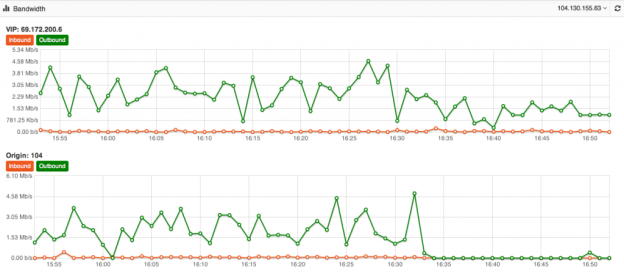
 Its one of the biggest mysteries to me I have seen in my 15+ years of Internet hosting and cloud based services. The mystery is, why do people use a Content Delivery Network for their website yet never fully optimize their site to take advantage of the speed and volume capabilities of the CDN. Just because you use a CDN doesn’t mean your site is automatically faster or even able to take advantage of its ability to dish out mass amounts of content in the blink of an eye. At DOSarrest I have seen the same mystery continue, this is why I have put together this piece on using a CDN and hopefully help those who wish to take full advantage of a CDN. Most of this information is general and can be applied to using any CDN but I’ll also throw in some specifics that relate to DOSarrest. Some common misconceptions about using a CDN As soon as I’m configured to use a CDN my site will be faster and be able to handle a large amount of web visitors on demand. Website developers create websites that are already optimized and a CDN won’t really change much. There’s really nothing I can do to make my website run faster once its on a CDN. All CDN’s are pretty much the same. Here’s what I have to say about the misconceptions noted above In most cases the answer to this is…. NO !! If the CDN is not caching your content your site won’t be faster, in fact it will probably be a little slower, as every request will have to go from the visitor to the CDN which will in turn go and fetch it from your server then turn around and send the response back to the visitor. In my opinion and experience website developers in general do not optimize websites to use a CDN. In fact most websites don’t even take full advantage of a browsers’ caching capability. As the Internet has become ubiquitously faster, this fine art has been left by the wayside in most cases. Another reason I think this has happened is that websites are huge, complex and a lot of content is dynamically generated coupled with very fast servers with large amounts of memory. Why spend time on optimizing caching, when a fast server will overcome this overhead. Oh yes you can and that’s why I have written this piece…see below No they aren’t. Many CDN’s don’t want you know how things are really working from every node that they are broadcasting your content from. You have to go out and subscribe to a third party service, if you have to get a third party service, do it, it can be fairly expensive but well worth it. How else will you know how your site is performing from other geographic regions. A good CDN should let you know the following in real-time but many don’t. Number of connections/requests between the CDN and Visitors. Number of connections/requests between the CDN and your server (origin). You want try and have the number of requests to your server to be less than the number of requests from the CDN to your visitors. *Tip- Use HTTP 1.1 on both “a” & “b” above and try and extend the keep-alive time on the origin to CDN side Bandwidth between the CDN and Internet visitors Bandwidth between the CDN and your server (origin) *Tip – If bandwidth of “c” and “d” are about the same, news flash…You can make things better. Cache status of your content (how many requests are being served by the CDN) *Tip – This is the best metric to really know if you are using your CDN properly. Performance metrics from outside of the CDN but in the same geographic region *Tip- Once you have the performance metrics from several different geographic regions you can compare the differences once you are on a CDN, your site should load faster the further away the region is located from your origin server, if you’re caching properly. For the record DOSarrest provides all of the above in real-time and it’s these tools I’ll use to explain on how to take full advantage of any CDN but without any metrics there’s no scientific way to know you’re on the right track to making your site super fast. There are five main groups of cache control tags that will effect how and what is cached. Expires : When attempting to retrieve a resource a browser will usually check to see if it already has a copy available for reuse. If the expires date has past the browser will download the resource again. Cache-control : HTTP 1.1 this expands on the functionality offered by Expires. There are several options available for the cache control header: – Public : This resource is cacheable. In the absence of any contradicting directive this is assumed. – Private : This resource is cachable by the end user only. All intermediate caching devices will treat this resource as no-cache. – No-cache : Do not cache this resource. – No-store : Do not cache, Do not store the request, I was never here – we never spoke. Capiche? – Must-revalidate : Do not use stale copies of this resource. – Proxy-revalidate : The end user may use stale copies, but intermediate caches must revalidate. – Max-age : The length of time (in seconds) before a resource is considered stale. A response may include any combination of these headers, for example: private, max-age=3600, must-revalidate. X-Accel-Expires : This functions just like the Expires header, but is only intended for proxy services. This header is intended to be ignored by browsers, and when the response traverses a proxy this header should be stripped out. Set-Cookie : While not explicitly specifying a cache directive, cookies are generally designed to hold user and/or session specific information. Caching such resources would have a negative impact on the desired site functionality. Vary : Lists the headers that should determine distinct copies of the resource. Cache will need to keep a separate copy of this resource for each distinct set of values in the headers indicated by Vary. A Vary response of “ * “ indicates that each request is unique. Given that most websites in my opinion are not fully taking advantage of caching by a browser or a CDN, if you’re using one, there is still a way around this without reviewing and adjusting every cache control header on your website. Any CDN worth its cost as well as any cloud based DDoS protection services company should be able to override most website cache-control headers. For demonstration purposes we used our own live website DOSarrest.com and ran a traffic generator so as to stress the server a little along with our regular visitor traffic. This demonstration shows what’s going on, when passing through a CDN with respect to activity between the CDN and the Internet visitor and the CDN and the customers server on the back-end. At approximately 16:30 we enabled a feature on DOSarrest’s service we call “Forced Caching” What this does is override in other words ignore some of the origin servers cache control headers. These are the results: Notice that bandwidth between the CDN and the origin (second graph) have fallen by over 90%, this saves resources on the origin server and makes things faster for the visitor. This is the best graphic illustration to let you know that you’re on the right track. Cache hits go way up, not cached go down and Expired and misses are negligible. The graph below shows that the requests to the origin have dropped by 90% ,its telling you the CDN is doing the heavy lifting. Last but not least this is the fruit of your labor as seen by 8 sensors in 4 geographic regions from our Customer “ DEMS “ portal. The site is running 10 times faster in every location even under load !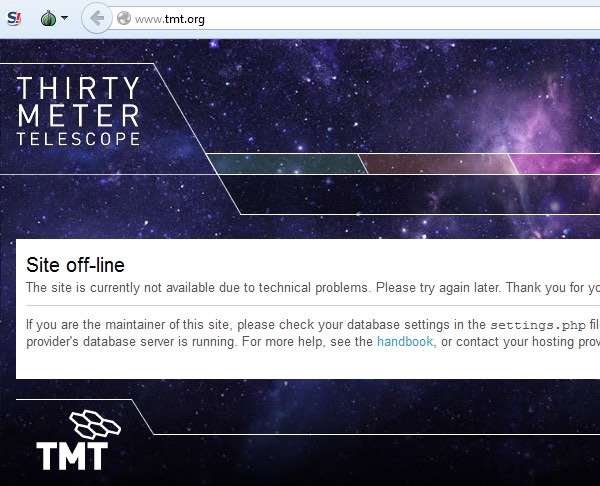
 Hacktivists have launched a distributed denial-of-service attack against the website of TMT (Thirty Meter Telescope), which is planned to be the Northern hemisphere’s largest, most advanced optical telescope. For at least two hours yesterday, the TMT website at www.tmt.org was inaccessible to internet users. Sandra Dawson, a spokesperson for the TMT project, confirmed to the Associated Press that the site had come under attack: “TMT today was the victim of an unscrupulous denial of service attack, apparently launched by Anonymous. The incident is being investigated.” You might think that a website about a telescope is a strange target for hackers wielding the blunt weapon of a DDoS attack, who might typically be more interested in attacking government websites for political reasons or taking down an unpopular multinational corporation. Why would hackers want to launch such a disruptive attack against a telescope website? Surely the only people who don’t like telescopes are the aliens in outer space who might be having their laundry peeped at from Earth? It turns out there’s a simple reason why the Thirty Meter Telescope is stirring emotions so strongly: it hasn’t been built yet. The construction of the proposed TMT is controversial because it is planned to be be constructed on Mauna Kea, a dormant 13,796 foot-high volcano in Hawaii. This has incurred the wrath of environmentalists and native Hawaiians who consider the land to be sacred. There has been considerable opposition to the building of the telescope on Mauna Kea, as this news report from last year makes clear. Now it appears the protest about TMT has spilt over onto the internet in the form of a denial-of-service attack. Operation Green Rights, an Anonymous-affiliated group which also campaigns against controversial corporations such as Monsanto, claimed on its Twitter account and website that it was responsible for the DDoS attack. The hacktivists additionally claimed credit for taking down Aloha State’s official website. It is clear that denial-of-service attacks are being deployed more and more, as perpetrators attempt to use the anonymity of the internet to hide their identity and stage the digital version of a “sit down protest” or blockade to disrupt organisations. Tempting as it may be to participate in a DDoS attack, it’s important that everyone remembers that if the authorities determine you were involved you can end up going to jail as a result. Peaceful, law-abiding protests are always preferable. Source: http://www.welivesecurity.com/2015/04/27/tmt-website-ddos/